

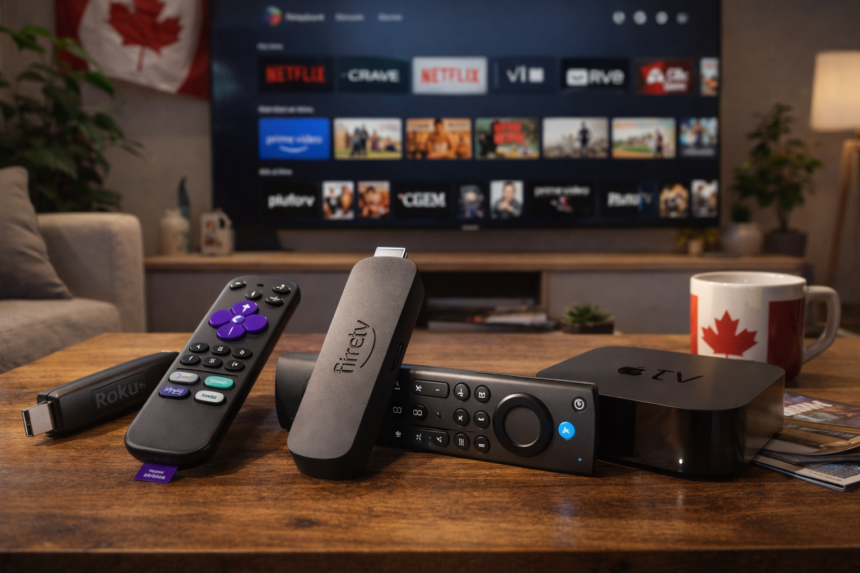
Cutting the cable cord in Canada has never been more straightforward. With the right streaming media device, you can access Netflix, Crave, CBC Gem, Sportsnet+, and dozens of other legal services without paying for channels you never watch. We have tested the leading media streaming devices on Canadian ISPs and compiled this comprehensive guide to help you find the perfect fit for your household.
- Key Takeaways
- What Is a Streaming Media Device, and Why Do Canadians Still Need One in 2026?
- What Is the Best Overall Streaming Media Device for Most Canadians?
- What Is the Best Google TV Media Streamer for Canadian Users?
- What Is the Best Budget Streaming Stick for Under $75 CAD?
- What Is the Best Premium Streaming Box for Power Users and Smart Homes?
- What Is the Best Simple Streamer for Older 1080p TVs in Canada?
- How Do the Best Streaming Devices Compare for Canadian Cord-Cutters?
- How Fast Does My Internet Need to Be in Canada to Stream HD and 4K Legally?
- How Do I Choose the Best Legal Streaming Device for My Canadian Household?
- What Does Amazon Fire TV Actually Do for Canadian Cord-Cutters?
- What Does Google TV Offer That Is Different for Canadians?
- What Does Roku Do Differently From Other Platforms?
- Is the Apple TV 4K Worth It in 2026 for Canadians?
- Can I Stream 8K in Canada Yet, or Is 4K Still the Standard?
- How We Test Streaming Media Devices for Canadian Households
- FAQ
Key Takeaways
- Our top picks for Canadian cord-cutters in 2026 are the Apple TV 4K, Amazon Fire TV Stick 4K Max, Roku Streaming Stick 4K, Google TV Streamer, and Fire TV Cube—all tested on Bell, Rogers, and Telus networks and relying exclusively on official app stores.
- Dedicated media streamers almost always outperform built-in smart TV apps for speed, app selection, and long-term software updates, particularly when streaming 4K HDR content.
- The Fire TV Stick and Google TV sticks deliver the best value for most Canadian households, while the Apple TV 4K and Fire TV Cube are ideal for power users seeking premium performance and smart home integrations.
- Minimum internet speeds for stable streaming in Canada are approximately 5 Mbps for HD and 25 Mbps or higher for 4K; strong Wi-Fi near your television or a wired Ethernet connection ensures the smoothest experience.
- For deeper setup walkthroughs and network optimisation tips, explore our “Setup & Performance” category or sign up for our Canadian streaming newsletter to receive ongoing recommendations tailored to your province and ISP.
What Is a Streaming Media Device, and Why Do Canadians Still Need One in 2026?
A streaming media device is a compact stick or streaming box that plugs into your television’s HDMI port and replaces traditional cable with apps like Netflix, Crave, Disney+, CBC Gem, Sportsnet+, and more. Most devices require an HDMI cable for setup—some include it in the box, while others require you to purchase one separately. Some streaming sticks can be powered directly from the TV’s USB port, which reduces the need for a separate power adapter and helps minimize cable clutter. Think of it as a small computer dedicated entirely to delivering entertainment from your chosen streaming service to your screen.
These dedicated streaming devices differ from built-in smart TV platforms in several important ways:
- Faster processors: Modern streaming sticks and boxes feature chips that launch apps and navigate menus far more quickly than many smart TVs built three or four years ago.
- More frequent updates: Manufacturers like Amazon, Google, Roku, and Apple push regular firmware improvements, ensuring your device stays compatible with evolving streaming services.
- Better app selection: Some older smart TVs lose support for key Canadian apps like Crave or CBC Gem, while dedicated media streamers maintain broad compatibility.
- Superior voice control: Alexa, Google Assistant, and Siri integrations on streaming devices tend to be more responsive and feature-rich than what is baked into most smart TVs.
The Canadian context matters here. Many 2018–2021 smart TVs are already slowing down on Bell, Rogers, and Telus networks, and some no longer receive app updates for services like Crave, CBC Gem, or YouTube. If you have noticed your television’s built-in apps becoming sluggish or unreliable, a streaming device is often the most cost-effective fix.
Common reasons Canadian readers upgrade to a dedicated streamer include:
- Cutting cable TV entirely and consolidating entertainment through legal apps
- Wanting reliable 4K HDR playback for Netflix, Prime Video, and Disney+
- Needing legal sports streaming through Sportsnet+ and TSN+
- Breathing new life into an older 1080p TV that still has years of use left
When setting up your device, connecting it to a stable and fast home Wi-Fi network is essential for smooth HD and 4K streaming performance.
All devices covered in this guide are 100% legal, rely exclusively on official app stores (Amazon Appstore, Google Play, Apple App Store, and Roku Channel Store), and are suitable for Canadian households of any size.

What Is the Best Overall Streaming Media Device for Most Canadians?
For 2026, our “Best Overall” pick for Canadian cord-cutters is the Roku Streaming Stick 4K. We favour this device because it strikes an ideal balance of performance, simplicity, and value—delivering a clean interface that does not push any single service over another while supporting all the apps Canadians actually use.
Key Features
- 4K resolution at 60 frames per second with HDR10+, Dolby Vision support, and HLG
- Dolby Atmos passthrough for compatible soundbars and receivers
- Quad-core processor with snappy app launches
- Wi-Fi connectivity optimised for modern home networks (though lacking Wi-Fi 6)
- Compact form factor that hides behind most televisions
- Simple remote with dedicated shortcut buttons and voice search
Canadian App Support
The Roku Streaming Stick 4K provides access to:
- Netflix, Prime Video, Disney+, and Apple TV+
- Crave and CBC Gem for Canadian-produced content
- Citytv, Global TV, and CTV for broadcast programming
- Sportsnet+ and TSN+ for live Canadian sports
- YouTube and free ad-supported options like Tubi and Pluto TV
- French-language services including Tou.TV for Québec households
Our Test Experience
In our tests on a typical Canadian high-speed connection (150–300 Mbps from Rogers), the Roku Streaming Stick 4K delivered consistent, vibrant playback with zero buffering. Menu navigation felt responsive, and loading apps rarely took more than a few seconds. Picture quality on a 4K HDR television was excellent, with accurate colours and smooth motion handling during sports and action sequences.
Strengths: Future-proof 4K HDR support, excellent app ecosystem, neutral interface that treats all major streaming services equally, and a remote that non-technical family members find intuitive.
Limitations: No Ethernet port (though USB adapters exist), lacks Wi-Fi 6 for congested networks, and does not support Chromecast casting from Android devices.
What Is the Best Google TV Media Streamer for Canadian Users?
For Canadians who prefer the Google ecosystem, the Google TV Streamer (4K) is our top recommendation. This device represents Google’s strategic shift toward more powerful, feature-rich hardware—offering improved picture performance, faster processing, and tighter integration with Google services compared with earlier Chromecast models.
Key Features
- 4K HDR with Dolby Vision and HDR10+ support
- Dolby Atmos passthrough for immersive sound
- Google Assistant voice control with far-field microphones
- Google Cast support for streaming from Android phones and Chrome browsers
- Improved Wi-Fi performance over previous generations
- Sleek, slanted design with more internal storage than older Chromecasts
How Google TV Works in Canada
The Google TV interface aggregates content from your subscribed services into a unified home screen:
- The “For You” tab surfaces recommendations from Netflix, Crave, Disney+, Prime Video, CBC Gem, and YouTube based on your viewing history
- Google’s algorithms learn your preferences over time, making content discovery genuinely useful
- Generative AI search lets you ask more nuanced questions in a natural, conversational way—helpful when hunting for specific Canadian titles or bilingual French/English content
Smart Home Advantages
For Canadians with Nest cameras, smart lights, or Google-compatible thermostats:
- View camera feeds directly on your television
- Control compatible devices using voice commands through the Google TV Streamer
- Access a unified smart home dashboard without leaving the streaming interface
Our Test Results
On a 200 Mbps Bell Fibe connection, the Google TV Streamer launched apps quickly and maintained stable 4K HDR playback during prime-time hours. Voice search accurately found Canadian shows and handled bilingual queries well. Casting from an Android phone worked seamlessly, making it easy to share content from mobile devices to the big screen.
Best for: Android phone users, Google ecosystem fans, and viewers who want powerful voice search and content aggregation rather than the simplest possible interface.
What Is the Best Budget Streaming Stick for Under $75 CAD?
If you want excellent 4K streaming without a significant investment, the Amazon Fire TV Stick 4K Max is our best budget pick. Widely available in Canada at or under $75 CAD during sales, this device punches well above its price point.
Another strong contender is the Onn 4K Pro, a budget-friendly streaming device that supports 4K content and Dolby Vision. It offers similar features to premium models at about half the price, making it an excellent value for those seeking high-quality streaming on a budget.
Key Specifications
- 4K resolution at 60fps with Dolby Vision, HDR10+, and HLG support
- Dolby Atmos for compatible audio setups
- Wi-Fi 6 support for faster, more stable connections on compatible routers
- Processor nearly 30 percent more powerful than the previous generation
- Alexa Voice Remote with TV power, volume controls, and app shortcut buttons
Canadian App Ecosystem on Fire TV
The Amazon Fire TV Stick 4K Max supports:
- Netflix, Prime Video, Disney+, and Apple TV+
- Crave, CBC Gem, Global TV, and Citytv
- Sportsnet+ and TSN+ for live sports
- YouTube and free legal options like Tubi and Pluto TV (where available in Canada)
- All the apps you need from the Amazon Appstore
We should note that Fire OS can be ad-heavy on the home screen. We recommend customising the top row with your most-used apps to minimise clutter and reduce Amazon’s promotional content.
Performance on Canadian Networks
In our tests on a typical Canadian mid-tier internet plan (75–150 Mbps from Telus), the TV Stick 4K Max opened apps quickly and streamed 4K HDR content without stutters or slowdowns. Even during peak evening hours, we experienced no buffering on Netflix or Crave. Wi-Fi 6 connectivity helped keep things smooth in a household with multiple connected devices.
Best for: Most Canadian cord-cutters upgrading a 4K TV who want the best streaming stick at a budget-friendly price. If you have an older 1080p-only television, consider the Fire TV Stick HD instead—it costs less and matches your display’s capabilities.

What Is the Best Premium Streaming Box for Power Users and Smart Homes?
For enthusiasts who demand the fastest performance, the most storage, and deep smart home integration, two devices stand above the rest: the Apple TV 4K (3rd generation) and the Amazon Fire TV Cube (3rd generation).
Another top-tier option for power users is the NVIDIA Shield TV Pro. As a premium Android TV box, the Shield TV Pro is renowned for its robust processing power and versatility, making it ideal for streaming, gaming, and home cinema setups. It features advanced AI upscaling technology that enhances lower-resolution content to near-4K quality, delivering a sharper and more detailed viewing experience. Despite being an older model, the Shield TV Pro remains superior for high-end gamers and users who require Plex media server capabilities. It offers two USB 3.0 ports for expanded storage or local media playback, supports high-resolution audio and Dolby Atmos, and can function as a Plex server. Additionally, the Shield TV Pro supports GeForce Now cloud gaming, setting it apart from simpler streaming devices.
Apple TV 4K
- A15 Bionic chip: The same processor found in recent iPhones, delivering blazing-fast navigation and app launches
- 4K HDR with Dolby Vision: Exceptional picture quality on compatible televisions
- Dolby Atmos and DTS Digital Surround: Comprehensive audio formats for home theatre setups
- Wi-Fi 6 and optional built-in Ethernet port: Choose the 128GB model for wired connectivity without adapters
- Apple Arcade: Access to hundreds of games with a compatible controller
- AirPlay and HomeKit: Stream from any iOS device, control Apple devices seamlessly, and use Apple TV as a smart home hub
Fire TV Cube
- Octa-core processor: The most powerful, fastest Fire TV device yet
- 4K HDR with Dolby Vision and HDR10+: Supports all major HDR formats
- Dolby Atmos: Immersive surround sound passthrough
- Wi-Fi 6E and built-in Ethernet port: Wired connectivity without adapters for demanding setups
- Hands-free Alexa: Far-field microphones let you control your television, smart home devices, and content without touching the remote
- HDMI input: Connect a cable box or game console and control everything through one interface
Canadian Content Experience
Both devices support all major streaming apps:
- Netflix, Prime Video, Disney+, and Apple TV+
- Crave, CBC Gem, Global TV, and Citytv
- Sportsnet+ and TSN+ for comprehensive Canadian sports coverage
However, the Apple TV 4K particularly favours Apple users who subscribe to Apple TV+, Apple Music, and Apple Arcade. Apple fans will appreciate how these services integrate with the “Up Next” queue and universal search.
Home Theatre Testing
We tested both devices on Canadian 4K HDR televisions (LG OLED and Samsung QLED) paired with Dolby Atmos-capable soundbars:
- Picture quality was exemplary on both, with accurate colours, deep blacks, and smooth motion handling
- Dolby Atmos content delivered immersive surround sound with clear height effects
- Navigation felt instantaneous, with no perceptible lag between menu selections
Choose Apple TV 4K if you are deeply invested in Apple devices, use AirPods with your television, or want HomeKit smart home integration.
Choose Fire TV Cube if you already rely on Alexa smart speakers, want hands-free voice control throughout your living room, or need the HDMI input for legacy devices.
What Is the Best Simple Streamer for Older 1080p TVs in Canada?
Many Canadians still have perfectly functional 1080p televisions in bedrooms, cottages, or basements. For these secondary screens, an inexpensive Full HD streamer is all you need.
Some streaming sticks can be powered directly via the TV’s USB port, which reduces the need for a separate power adapter and helps minimize e-waste.
Our recommendations for 1080p-focused streaming include the Amazon Fire TV Stick (3rd generation, 1080p) and the Roku Express HD—both readily available on sale in Canada for under $50.
Key Specifications
- 1080p resolution with basic HDR support (varies by model)
- Dolby Atmos passthrough where supported
- Compact design that plugs directly into your TV’s HDMI port
- Simple remote with essential navigation and playback controls
- The Roku Streaming Stick Plus plugs into your TV’s USB port for power, eliminating the need for a separate adapter in some cases
Canadian App Support
Even these budget devices run:
- Netflix, Crave, CBC Gem, Disney+, and Prime Video
- YouTube, Global TV, and Citytv
- Free ad-supported services for casual viewing
Real-World Performance
In our tests on slower rural internet connections (10–25 Mbps DSL), these devices delivered stable 1080p playback without significant buffering. The interfaces feel slightly less snappy than their 4K siblings, but for casual bedroom viewing, the experience remains perfectly acceptable.
Recommendation: Reserve these 1080p streamers for non-primary televisions or lower-speed connections. Serious movie and sports fans with 4K sets should step up to a 4K streaming device to take full advantage of their display.
How Do the Best Streaming Devices Compare for Canadian Cord-Cutters?
To help you make a quick decision, we have assembled a comparison table covering the leading devices specifically for Canadian households.
Device | Approx. Price (CAD) | Max Resolution/HDR | Audio | Wi-Fi/Ethernet | Best For | Canadian App Coverage |
|---|---|---|---|---|---|---|
Apple TV 4K (3rd gen) | $179–$229 | 4K HDR, Dolby Vision | Dolby Atmos | Wi-Fi 6, Ethernet (128GB) | Apple users, premium picture quality | Excellent |
Amazon Fire TV Stick 4K Max | $55–$75 | 4K HDR, Dolby Vision, HDR10+ | Dolby Atmos | Wi-Fi 6 | Budget-conscious 4K upgraders | Excellent |
Amazon Fire TV Cube (3rd gen) | $169–$189 | 4K HDR, Dolby Vision, HDR10+ | Dolby Atmos | Wi-Fi 6E, Ethernet | Smart home enthusiasts, hands-free control | Excellent |
Roku Streaming Stick 4K | $49–$69 | 4K HDR, Dolby Vision, HDR10+ | Dolby Atmos | Wi-Fi 5 | Simple interface, neutral platform | Excellent |
Roku Ultra | $99–$129 | 4K HDR, Dolby Vision | Dolby Atmos | Wi-Fi 6, Ethernet port | Wired connections, remote finder button | Excellent |
Google TV Streamer (4K) | $89–$119 | 4K HDR, Dolby Vision, HDR10+ | Dolby Atmos | Wi-Fi 6 | Google ecosystem, voice search | Excellent |
Amazon Fire TV Stick HD | $35–$49 | 1080p, basic HDR | Dolby Atmos | Wi-Fi 5 | 1080p TVs, budget setups | Excellent |
Sky Stream | Varies (import) | 4K HDR | Dolby Atmos | Wi-Fi, Ethernet | Modern broadband-based streaming, replaces satellite dishes, Sky & Netflix content | Limited (mainly UK apps) |
Notes on connectivity: The Apple TV 4K (128GB model), Amazon Fire TV Cube, and Roku Ultra include built-in Ethernet ports—important for busy Bell, Rogers, or Telus households with congested Wi-Fi. Other streaming devices offer USB-to-Ethernet adapters sold separately. All devices listed support Dolby Vision and Dolby Atmos for high-end televisions and sound systems.
Note: Sky Stream is a modern, broadband-based streaming device with a sleek design and easy setup. It replaces traditional satellite dishes and offers content options including Sky and Netflix, delivering high-quality picture and sound. While primarily available in the UK, it is a versatile streaming hub for those seeking an alternative to satellite TV.
How Fast Does My Internet Need to Be in Canada to Stream HD and 4K Legally?
Our guidance is based on testing with major Canadian ISPs—Bell, Rogers, Telus, Shaw/Freedom, and Vidéotron—and typical 2026 consumer plans. Media streamers offer both wired Ethernet and wireless connection options to ensure optimal streaming quality and reliability, especially for high-definition content.
Minimum Speed Requirements
- 5 Mbps per stream: Adequate for stable 1080p HD playback
- 15 Mbps per stream: Recommended for 1080p at higher bitrates (live sports, action content)
- 25 Mbps minimum: Required for stable 4K HDR streaming on a single device
- 50 Mbps or higher: Essential if multiple people are streaming simultaneously
Wi-Fi Quality Matters
The speed your television receives often differs from the speed your ISP advertises:
- Test your actual speeds using a phone or laptop positioned beside your TV
- If speeds drop significantly compared to your modem/router location, consider a mesh Wi-Fi system or relocating your router closer to your entertainment centre
- Thick walls, microwaves, and neighbouring Wi-Fi networks can all degrade signal quality
When to Favour Ethernet Connectivity
We recommend wired Ethernet connections for:
- Condos with congested Wi-Fi from dozens of neighbouring networks
- Large homes where Wi-Fi signal weakens before reaching the television
- Serious 4K sports and movie watching on premium devices like Apple TV 4K or Fire TV Cube
- Households where buffering during peak hours is a recurring frustration
All recommended devices automatically adjust video quality based on available bandwidth, so viewers on smaller rural plans can still enjoy stable HD as long as expectations are set appropriately.
How Do I Choose the Best Legal Streaming Device for My Canadian Household?
This buyer’s guide section provides practical, step-by-step guidance rather than deep technical jargon.
Step-by-Step Decision Framework
- Confirm your TV resolution: Is your primary television 1080p or 4K HDR? Choose a device that matches your display’s capabilities.
- Check HDMI ports: Ensure you have at least one available HDMI port. Some older TVs may require HDMI switches if all ports are occupied.
- Confirm your home internet speed: Run a speed test near your television. You need at least 25 Mbps for reliable 4K streaming.
- List your must-have legal apps: Most Canadians want Netflix, Crave, CBC Gem, Prime Video, Disney+, and at least one sports app (Sportsnet+ or TSN+). Verify your chosen device supports all of them.
Ecosystem Preferences
- Choose Apple TV 4K if you own iPhones, iPads, and a Mac. Apple AirPlay support, Apple Music integration, and HomeKit compatibility make it the natural choice for Apple fans.
- Choose Fire TV if you are a heavy Amazon Prime Video user, rely on Alexa smart speakers, or prefer devices from Amazon’s ecosystem.
- Choose Google TV if you use Android phones, rely on Google services, and want powerful voice commands through Google Assistant.
- Choose Roku if you prefer devices that treat all services equally and want the simplest, most neutral Roku interface without favouring any single streaming platform.
Remote and Voice Control Preferences
- Hands-free living room control: Favour the Fire TV Cube with far-field microphones
- Straightforward remote with minimal clutter: Favour the Roku Streaming Stick 4K or Apple TV 4K; both offer integrated TV controls, allowing you to adjust volume and power your TV directly from the streaming remote, reducing the need for multiple remotes.
- Voice commands through your phone: Google TV lets you cast and control via Android devices
Stay Legal
We cannot stress this enough: stick to official app stores and well-known platforms only. Avoid any “free movie” sites, unofficial IPTV services, or sideloaded apps that may violate terms of service or Canadian copyright law. Every device and service in this guide operates within legal boundaries.
For device-specific setup walkthroughs, Wi-Fi tuning tips, and legal Canadian app recommendations tailored to different provinces and ISPs, visit our “Setup & Performance” category.

What Does Amazon Fire TV Actually Do for Canadian Cord-Cutters?
Amazon Fire TV is Amazon’s streaming platform, found on Fire TV Sticks and Fire TV Cube devices. In Canada, the platform centres on Prime Video but supports all major streaming services without restriction. The Amazon Fire TV Stick 4K Max also supports Sling TV channels and integration, allowing users to access Sling TV content directly through the device interface.
The Fire TV Home Screen
The Fire TV interface presents:
- Rows of app icons for quick access to your favourite services
- Show and movie recommendations based on your viewing history
- Sections for live content from Prime Video Channels and, when subscribed, services like Sportsnet+
- A customisable top row where you can pin your most-used apps
Supported Legal Canadian Apps
Amazon Fire TV provides access to:
- Netflix, Prime Video, Disney+, and Apple TV+
- Crave, CBC Gem, Global TV, and Citytv
- Sportsnet+ and TSN+ for live Canadian sports
- YouTube and free content through ad-supported apps like Tubi and Pluto TV
Alexa Integration
Amazon Fire TV devices feature deep Alexa integration:
- Press and hold the voice remote button to search for titles, actors, or apps
- Say “Alexa, open Crave” or “Alexa, start CBC Gem” to launch apps hands-free
- Control compatible smart lights, thermostats, and other smart home devices directly from your couch
- On Fire TV Cube, far-field microphones allow hands-free voice control without touching the remote
Our Testing Experience
On a Fire TV Stick 4K Max connected to a 200 Mbps Rogers Ignite plan, we found the device exceptionally responsive. Apps opened within two to three seconds, and 4K HDR streams played without interruption during evening peak hours. The voice remote handled Canadian content searches accurately, and Alexa understood requests for specific shows on Crave and CBC Gem without issue.
What Does Google TV Offer That Is Different for Canadians?
Google TV is Google’s modern smart TV platform, replacing classic Android TV on many devices. In Canada, you will find it on the Google TV Streamer, Chromecast with Google TV, and select smart TVs from manufacturers like Sony and TCL.
The Unified Interface
Google TV aggregates content differently than competitors:
- The “For You” tab combines recommendations from Netflix, Crave, Disney+, Prime Video, and YouTube into a single feed
- A “Live” tab appears when you connect live TV services
- The interface learns your preferences over time, surfacing relevant content without requiring you to navigate into each app individually
Google Assistant Voice Search
Google Assistant on Google TV is remarkably capable:
- Press the microphone button to ask for specific Canadian shows, genres, or sports
- Request bilingual content in French or English
- Control compatible Nest devices like cameras and smart speakers directly from your television
- Use voice commands to adjust playback, search actors, or discover new content
Canadian App Availability
All major streaming services work on Google TV in Canada:
- Netflix, Crave, CBC Gem, Prime Video, and Disney+
- Apple TV+ (through the dedicated app)
- Sportsnet+, TSN+, and YouTube
- Niche services and free ad-supported options available through Google Play
Our Test Impressions
After a few days of use on a 150 Mbps Telus connection, the Google TV Streamer’s recommendations became surprisingly accurate. The interface scrolls smoothly, app launches are quick, and casting from Android phones or Chrome browsers worked flawlessly. Voice search found Canadian titles reliably, including French-language content from Tou.TV and Radio-Canada.
What Does Roku Do Differently From Other Platforms?
Roku is known for its simple, tile-based interface and platform neutrality. Unlike Amazon or Google, Roku does not heavily favour any single streaming service, making it popular among users who want a low-maintenance device without constant promotional clutter.
Key Roku Features
- Grid of channel icons: Clean, straightforward navigation without algorithmic recommendations dominating the screen
- Minimal system clutter: The Roku interface stays out of your way
- Cross-app search: Find content across multiple services with a single search
- Relatively light ad presence: Less promotional content than some competitors
Canadian App Support on Roku
Roku devices support:
- Netflix, Prime Video, Disney+, and Apple TV+
- Crave, CBC Gem, Global TV, and Citytv
- Sportsnet+ and TSN+ for sports
- Free ad-supported services where available
Hardware Options for Canadians
- Roku Streaming Stick 4K: The average streaming stick for most 4K televisions—compact, affordable, and reliable
- Roku Ultra: For users needing an Ethernet port, stronger Wi-Fi, headphone jack for private listening, and a remote finder button to locate misplaced remotes
- Roku Express HD: Entry-level option for older 1080p TVs
Our Test Experience
On typical Canadian cable and fibre connections (100–300 Mbps), the Roku Streaming Stick 4K performed consistently without buffering or stuttering. Setup took less than ten minutes, and the remote control’s simple layout made it easy for non-technical family members to navigate. The Roku interface remains one of the most intuitive options for households where not everyone is comfortable with complex technology.
Is the Apple TV 4K Worth It in 2026 for Canadians?
The Apple TV 4K is the most expensive mainstream media streamer, but it offers the most polished experience—particularly for Canadians already using multiple Apple devices.
Hardware and Features
- A15 Bionic chip: The fastest processor in any streaming device, delivering instant app launches and buttery-smooth navigation
- 4K HDR with Dolby Vision: Exceptional picture quality on compatible televisions
- Dolby Atmos: Full surround sound support for home theatre setups
- Wi-Fi 6: Fast, stable wireless connectivity
- Optional Ethernet: The 128GB model includes a built-in Ethernet port
- Siri Remote with USB-C: Premium metal design with rechargeable battery
Ecosystem Benefits
For Apple users, the integration is unmatched:
- AirPlay: Stream content from your iPhone, iPad, or Mac to the television with a tap
- Apple Arcade: Access hundreds of games with a compatible controller
- Apple Fitness+: Follow workouts on the big screen
- HomeKit hub: Use Apple TV 4K as a smart home hub for HomeKit-compatible devices
- Apple Music: Access your entire music library through the television
Canadian Content Experience
The Apple TV 4K supports:
- Netflix, Disney+, Prime Video, and Apple TV+
- Crave, CBC Gem, Sportsnet+, and TSN+
- Global TV, Citytv, and YouTube
These apps integrate beautifully with Apple’s “Up Next” queue and universal voice search, making it easy to track what you are watching across services.
Our Testing on Canadian Networks
On a 500 Mbps Bell Fibe connection, the Apple TV 4K felt instantaneous. App switching happened without perceptible delay, and 4K HDR playback on an LG OLED looked stunning. Colours were accurate, motion was smooth, and Dolby Atmos content delivered impressive surround sound through a compatible soundbar.
Our verdict: Apple TV 4K is the right choice for viewers who prioritise picture quality, longevity, and deep Apple ecosystem integration over saving $50–$80 on hardware.

Can I Stream 8K in Canada Yet, or Is 4K Still the Standard?
As of 2026, 8K streaming is not realistically available in Canada from any major legal streaming services. For Canadian cord-cutters, 4K remains the practical high-end standard.
Why 8K Is Not Ready
- Netflix, Prime Video, Disney+, Crave, and Apple TV+ focus on 4K HDR content (Dolby Vision and HDR10+)
- 8K streaming would require enormous bandwidth—likely 80 Mbps or more per stream—and infrastructure that is not yet common in Canadian homes
- Very little native 8K content exists; most “8K” viewing involves upscaling lower-resolution sources
What About 8K Televisions?
Some retailers sell 8K panels, but these TVs upscale 4K and HD content rather than receiving native 8K streams. You are paying a premium for display technology that content creators have not yet embraced.
Our Recommendation
For Canadian households, prioritise a solid 4K HDR streamer and reliable internet (50–300 Mbps) over chasing 8K marketing claims. Any of the recommended 4K devices in this guide will remain relevant and capable for many years as codecs and bitrates gradually improve.
How We Test Streaming Media Devices for Canadian Households
We test devices in real Canadian homes and labs to ensure our recommendations reflect actual performance on Canadian networks.
Setup Testing
- Initial installation on both 4K and 1080p televisions
- Wi-Fi versus Ethernet performance comparisons
- HDMI-CEC behaviour (whether devices correctly control TV power and volume)
- Remote control responsiveness and battery life
App Testing
- Confirming availability and performance of Netflix, Crave, CBC Gem, Prime Video, Disney+, Apple TV+, Sportsnet+, TSN+, Global TV, Citytv, and free ad-supported apps
- Testing app launch times and navigation smoothness
- Verifying that Canadian-specific content (French-language programming, regional sports) is accessible
Performance Metrics
- App launch times measured in seconds
- Navigation smoothness evaluated during extended use
- Buffering incidents logged during prime-time hours (7–10 PM)
- 4K HDR consistency tested on realistic Canadian internet speeds (25–300 Mbps from Bell, Rogers, Telus, and regional providers)
Audio and Video Quality Checks
- Testing Dolby Vision and HDR10+ streams on calibrated 4K HDR televisions, noting that a device that supports Dolby Vision enhances picture quality on compatible TVs and is a key feature for high-end streaming devices
- Assessing Dolby Atmos output with compatible soundbars and AV receivers
- Verifying lip-sync stability across different content types
We revisit devices after firmware updates and operating system upgrades, updating our recommendations to reflect long-term reliability and ongoing support in the Canadian market.
FAQ
Do I Need an Amazon Prime Subscription to Use a Fire TV Stick in Canada?
An Amazon account is required to activate any Fire TV device during initial setup. However, a paid Prime membership is not mandatory—you can use Fire TV without subscribing to Amazon Prime.
Without Prime, Canadian users can still install and use legal apps like Netflix, Crave, CBC Gem, Disney+, YouTube, Sportsnet+, TSN+, and more from the Amazon Appstore. Fire TV will promote Prime Video content on the home screen, but you are free to focus on other streaming services. Setting your favourite apps in the top row reduces Prime-centric recommendations.
Will a Streaming Stick Work With My Older Non-Smart TV?
Any television with at least one HDMI port can use modern streaming sticks and boxes, regardless of whether it has “smart” features built in. This includes plasma TVs, older LCD models, and basic 1080p sets.
For older 1080p TVs, a budget HD or 4K stick (set to 1080p output) is usually sufficient. Audio will pass through the TV’s speakers or your connected sound system as normal. If your television lacks HDMI entirely (very old models), you would need a separate HDMI-to-AV converter, and picture quality would be limited to standard definition.
Is It Legal to Use VPNs With Streaming Devices in Canada?
VPNs themselves are legal tools in Canada. However, using a VPN to bypass geographic content restrictions may violate the terms of service of certain streaming platforms, including Netflix, Crave, Prime Video, and Disney+.
We recommend reviewing each service’s terms before using a VPN and prioritising content that is licensed for Canada rather than attempting to access foreign catalogues. This guide focuses on 100% legal usage of streaming platforms and does not endorse any attempts to circumvent geographic licensing.
Can I Travel With My Streaming Stick Within Canada?
Most streaming sticks are highly portable. You can unplug your device and take it to cottages, hotels, or family homes anywhere in Canada.
You will need access to an HDMI port, a power outlet (or the TV’s USB port for power on compatible devices), and a Wi-Fi network. Some hotel or campus networks may require extra login steps via the device’s network tools or a phone-based workaround. We suggest logging out of personal apps before lending your device or leaving it at another location to protect your account security.
Where Can I Learn How to Optimise My New Streamer for Canadian Services?
Visit our “Setup & Performance” category for detailed Canadian-focused guides covering Fire TV, Roku, Google TV, and Apple TV 4K setup. These guides include network tuning tips, app configuration walkthroughs, and troubleshooting advice specific to Bell, Rogers, Telus, and regional ISPs.
Sign up for our Canadian streaming newsletter to receive alerts about new legal apps, platform updates, and practical tips for getting the most out of your devices across different provinces and internet providers.