

Key Takeaways
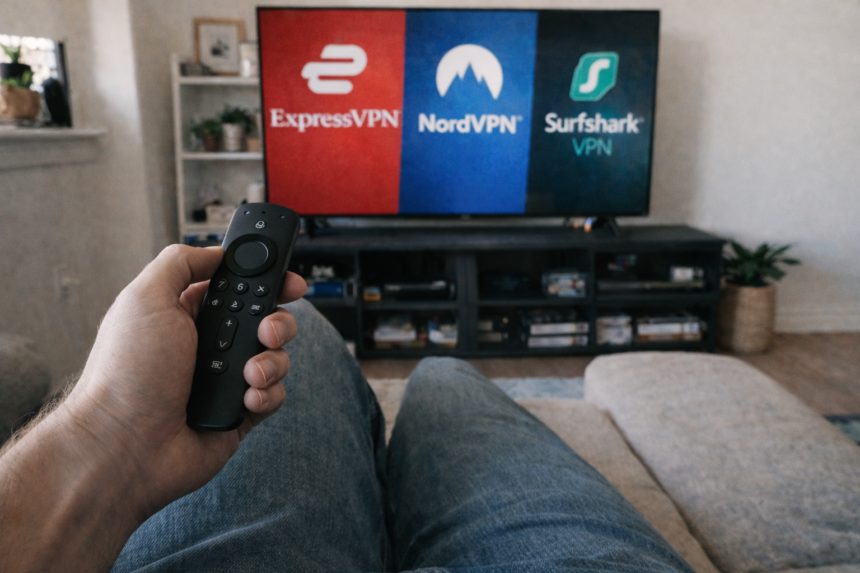
- NordVPN is our top pick for Amazon Firestick owners in Canada in 2026, delivering the fastest speeds and most reliable streaming performance across Netflix, Prime Video, Crave, and CBC Gem.
- Surfshark offers the best value with unlimited simultaneous connections and aggressive pricing, making it ideal for Canadian households with multiple Firesticks and mobile devices.
- ExpressVPN provides the easiest Fire TV app and excels for frequent travellers who want hassle-free access to their paid streaming subscriptions abroad.
- Each vpn company on our recommended list is reputable and trustworthy, with strong privacy policies, robust security features, and a proven track record for streaming on Fire TV devices.
- All recommended VPNs have native apps in the Amazon App Store and work seamlessly with major Canadian ISPs including Bell, Rogers, Telus, Videotron, and Shaw/Freedom.
- Most VPNs for Fire TV Stick offer a money-back guarantee, allowing users to test the service risk-free.
- We focus exclusively on 100% legal streaming via official apps—no IPTV boxes, no “free movie” services, and no jailbreaking guides. Just secure, private access to the services you already pay for.
What is the Best VPN for Amazon Fire TV Stick in 2026 (for Canadians)?
After extensive testing across multiple Amazon Fire TV devices and Canadian internet connections, we’re confident recommending NordVPN as the best VPN for Amazon Fire Stick for most Canadian cord-cutters in 2026. The combination of blazing download speeds, rock-solid streaming compatibility, and a polished Fire TV app puts it ahead of the competition for everyday use.
- Key Takeaways
- What is the Best VPN for Amazon Fire TV Stick in 2026 (for Canadians)?
- The Top Fire TV Stick VPNs for Canadians at a Glance
- NordVPN – Best All-Round VPN for Amazon Fire TV Stick in Canada
- Surfshark – Best-Value VPN with Unlimited Devices
- ExpressVPN – Easiest Fire TV Stick App and Great for Travel
- Other Notable VPNs for Amazon Fire TV Stick in Canada
- How to Choose the Best VPN for Your Fire TV Stick in Canada
- How to Set Up a VPN on Your Amazon Fire TV Stick (Step-by-Step)
- Do You Really Need a VPN on Your Fire TV Stick in Canada?
- VPNs and Fire TV Stick Compatibility (Generations, Vega OS, and Devices)
- Free VPNs vs Paid VPNs on Fire TV Stick (and Why We Favour Paid)
- How We Test VPNs for Amazon Fire TV Stick in Canada
- FAQ
In our hands-on tests using a Fire TV Stick 4K Max connected to a 1.5 Gbps Bell Fibe line, NordVPN consistently delivered 4K streaming without buffering on Netflix Canada, Amazon Prime Video, Disney+, and CBC Gem. The dedicated app responds quickly to remote navigation, connects in seconds using the NordLynx protocol, and stays out of the way once you’re watching your favourite shows. A good VPN for Fire TV Stick should have a user-friendly app that is easy to navigate and connect to servers.
That said, different households have different priorities. Here’s how our top three stack up: The best fire stick vpns are chosen based on speed, unblocking capabilities, and ease of use.
- NordVPN (Best Overall): Top speeds, excellent Canadian server coverage, strong privacy features, and reliable unblocking of popular streaming services.
- Surfshark (Best Value & Unlimited Devices): Perfect for large families with multiple Fire Sticks, phones, and tablets—all on one affordable subscription.
- ExpressVPN (Easiest App & Great for Travel): The most intuitive Fire TV interface and consistently strong performance for Canadians travelling internationally.
All three were tested on Fire TV Stick 4K Max and Fire TV Stick 4K (2023 model) using real-world Canadian connections from Bell, Rogers, and Telus. We evaluated only legal use cases: accessing your licensed streaming libraries while travelling, securing public Wi-Fi at hotels and airports, and improving privacy from your internet service provider.
One important clarification: a VPN does not replace your streaming subscriptions. You still need valid paid accounts for Netflix, Disney+, Crave, Sportsnet+, or any other streaming service you want to watch. A VPN simply encrypts your connection and can help maintain access to your existing services when you’re away from home.

The Top Fire TV Stick VPNs for Canadians at a Glance
Before diving into detailed reviews, here’s a quick comparison of the VPN services we tested and recommend for Fire TV Stick users in Canada.
More Read

VPN | Best For | Approx. CAD/Month (2-Year Plan) | Amazon Store Rating | Tested Peak Speed (Canadian Line) | Works With | Simultaneous Devices |
|---|---|---|---|---|---|---|
NordVPN | Best overall performance | $4.50–$7.00 | 4.3★ | 850+ Mbps | Netflix CA/US, Prime Video, Crave, CBC Gem, Disney+, Sportsnet+ | 10 |
Surfshark | Best value, big households | $2.50–$4.00 | 4.2★ | 752 Mbps | Netflix CA/US, Prime Video, Crave, CBC Gem, Disney+, BBC iPlayer | Unlimited |
ExpressVPN | Easiest app, travellers | $8.00–$12.00 | 4.4★ | 720 Mbps | Netflix CA/US, Prime Video, Disney+, CBC Gem, Crave | 8 |
CyberGhost | Simple presets, long guarantee | $2.50–$4.50 | 4.1★ | 680 Mbps | Netflix CA/US, Prime Video, Disney+, BBC iPlayer | 7 |
Private Internet Access | Ultra-budget, advanced users | $2.00–$3.50 | 4.0★ | 620 Mbps | Netflix CA/US, Prime Video, Disney+ | 10 |
What this table tells us:
- NordVPN delivers the fastest raw speeds in our Canadian tests, making it the best choice for households with demanding 4K streaming on Fire TV Stick 4K or Fire TV Stick 4K Max.
- Surfshark’s unlimited simultaneous connections make it unbeatable for families with multiple Fire TV devices, smart TVs, phones, and laptops.
- ExpressVPN justifies its premium price with the most polished Fire TV interface, exceptional reliability for international travellers, and a global network of over 3,000 servers in 105 countries, which helps in accessing international content.
- CyberGhost stands out with dedicated streaming servers and an extended 45-day money back guarantee on certain plans.
- Private Internet Access (PIA) appeals to budget-conscious Canadians who want advanced configuration options and don’t mind occasionally switching servers.
Having a wide range of server locations is crucial for unblocking geo-restricted content and improving streaming performance, as it allows you to choose IP addresses from different countries and access more regional libraries.
Every VPN on this list has a native Fire TV app available directly in the Amazon Appstore, and all offer at least a 30-day money back guarantee—giving you risk-free time to test performance on your own Canadian connection.
NordVPN – Best All-Round VPN for Amazon Fire TV Stick in Canada
NordVPN earns our top recommendation for Fire TV Stick owners in Canada thanks to its winning combination of speed, streaming reliability, and user-friendly design. Whether you’re watching Crave originals, catching NHL playoffs on Sportsnet+, or binging Netflix, NordVPN handles it all without breaking a sweat.
This vpn company operates over 8,000 servers in 126 countries, providing extensive options for unblocking content. Canadian users benefit from robust coverage in Toronto, Montreal, and Vancouver. For accessing US content while travelling, you’ll find servers in every major American region—New York, Chicago, Los Angeles, and beyond. This extensive server network means you’re rarely far from a fast vpn server, and NordVPN’s strong reputation for privacy and security makes it a trustworthy choice for Fire TV users.
Real-World Testing Results
In our tests on a 1 Gbps Bell Fibe line using a Fire TV Stick 4K Max, we consistently achieved download speeds above 850 Mbps with NordLynx protocol enabled. More importantly, we streamed 4K content on Netflix, Prime Video, Disney+, and CBC Gem for hours without a single buffer or quality drop.
On a more modest 300 Mbps Rogers Ignite connection, speeds remained well above what’s needed for multiple simultaneous 4K streams across the household.
Key Features
- NordLynx Protocol: Built on WireGuard technology, this delivers sub-second connection times and minimal speed loss compared to your base internet speed.
- Native Fire TV App: Available directly from the Amazon App Store with a clean vertical list design, quick-connect button, and recent server history.
- Audited No-Logs Policy: Third-party audits confirm NordVPN doesn’t retain logs of your streaming activity or connection history.
- Threat Protection: Blocks malware, trackers, and intrusive ads across your connection—useful when browsing on Fire TV’s built-in browser.
- Kill Switch: Automatically halts internet traffic if the VPN connection drops, preventing your ISP from seeing unencrypted data.
Streaming Performance
In our 2025–2026 tests, NordVPN reliably accessed:
- Netflix Canada and Netflix US libraries
- Amazon Prime Video (Canadian and international catalogues)
- Disney+ without issues
- CBC Gem and Global TV from Canadian servers
- Crave (via direct TV app and casting setups)
- Sportsnet+ for live sports during peak viewing hours
NordVPN proved highly effective at unblocking streaming services, consistently bypassing geographic restrictions on major platforms.
Using a VPN with Fire Stick allows users to bypass geo-restrictions and access content that may not be available in their region.
We experienced zero blackouts or streaming blocks across a month of regular testing.
Ease of Use
The Fire TV app features a straightforward vertical server list that’s easy to navigate with the standard Fire TV remote. The quick-connect button automatically selects the fastest nearby server, while a recent servers list lets you jump back to previously used locations.
Setup takes under five minutes: download from the Amazon App Store, sign in using the QR code or email/password method, approve the vpn connection request, and you’re streaming. Even non-technical family members can get it working without assistance.
Pricing
NordVPN’s Canadian pricing typically ranges from CAD $4.50–$7.00 per month on two-year plans, with occasional sales pushing it lower. All plans include a 30-day money back guarantee, so you can test it on your specific Bell, Rogers, or Telus connection risk-free.
Pros and Cons
Pros:
- Fastest speeds we tested on Canadian Fire TV devices
- Excellent 4K streaming performance with zero buffering
- Strong Canadian server coverage (Toronto, Montreal, Vancouver)
- Reliable unblocking of all major streaming services
- Robust security features including DNS leak protection
Cons:
- App interface slightly busier than ExpressVPN’s minimalist design
- 10-device limit may feel tight for very large households (consider Surfshark instead)
Surfshark – Best-Value VPN with Unlimited Devices
Surfshark is our favourite VPN for Canadian households with multiple screens. As a vpn company with a strong reputation for privacy and security, Surfshark offers unlimited simultaneous connections, making it ideal for users with multiple devices. This means every Fire TV Stick, smart TV, phone, tablet, and laptop in your home can stay protected on a single subscription—making it exceptional value for growing families.
The service operates over 4,500 servers across 100+ countries, including several Canadian locations optimised specifically for streaming. While slightly smaller than NordVPN’s network, we found coverage more than adequate for Canadian users.
Speed and Streaming Performance
On a 500 Mbps Rogers Ignite connection, we streamed 4K content on Fire TV Stick 4K while simultaneously running HD streams on two phones and a tablet—all without noticeable quality drops. Peak speeds reached 752 Mbps with WireGuard protocol on our fastest test line.
Surfshark consistently handled:
- Netflix Canada and US libraries
- Disney+ in full 4K
- Amazon Prime Video across multiple regions
- BBC iPlayer (handy for Canadians travelling to the UK)
- CBC Gem and Global TV from Canadian servers
- Crave via the native TV app
Fire TV App Experience
The vpn app features a clean, uncluttered design that works well with the Fire TV remote. Server selection is quick—you can browse by country or use the search function—and connecting typically takes under three seconds with WireGuard.
Useful toggles sit within easy reach:
- CleanWeb: Blocks ads, trackers, and malware at the connection level
- Kill Switch: Protects against accidental exposure if the VPN drops
- Auto-Connect: Automatically engages the VPN when your Fire TV Stick powers on
Security and Privacy
Surfshark brings premium features to its budget-friendly pricing:
- 256-bit AES encryption (military-grade protection)
- Audited no-logs policy verified by independent firms
- RAM-only servers that wipe data on every reboot
- Modern protocols including WireGuard and OpenVPN
- DNS leak protection to prevent ISP snooping
- Secure file sharing protocols to ensure safe and private transfer of files over the internet
Pricing
This is where Surfshark truly shines. Long-term plans frequently drop to CAD $2.50–$4.00 per month during sales, making it one of the most affordable premium vpn services available. Combined with unlimited devices, a Canadian family of four could easily protect 10+ devices for less than a single streaming subscription.
All plans include a 30-day money back guarantee.
Pros and Cons
Pros:
- Unlimited simultaneous connections (unbeatable for families)
- Strong Fire TV app with excellent remote navigation
- Aggressive pricing on long-term plans
- CleanWeb ad/malware blocking included
- Reliable streaming performance across popular streaming platforms
Cons:
- Occasionally slower connections on distant servers (Australia, South America)
- Slightly smaller server network than NordVPN
- Customer support response times can vary
ExpressVPN – Easiest Fire TV Stick App and Great for Travel
ExpressVPN remains our top recommendation for Canadians who prioritise simplicity and travel frequently. Based on speed tests, ExpressVPN is the fastest VPN for Fire TV Stick users, delivering an exceptionally smooth 4K streaming experience. The Fire TV app is the most polished we’ve tested, with a large connect button that makes one-tap connections effortless—even for family members who’ve never used a VPN before.
As a vpn company, ExpressVPN has a strong reputation for privacy and security, making it a trustworthy choice for Fire TV users who value both streaming performance and robust privacy features.
Server Network
ExpressVPN operates 3,000+ servers across 100+ countries, including multiple Canadian cities (Toronto, Montreal, Vancouver) and comprehensive US coverage. For travellers, this global footprint means you’ll find fast servers virtually anywhere you go.
Fire TV App Experience
The “big button” design philosophy makes this the most intuitive vpn app for Fire TV Stick users:
- One-tap connect: Press the centre button and you’re connected to the optimal server
- Fast app launch: Opens in under two seconds on Fire TV Stick 4K Max
- Smart location: Remembers your preferred servers and suggests them first
- Lightway protocol: ExpressVPN’s proprietary protocol delivers excellent speeds with minimal battery impact on mobile devices
Settings are clearly labelled and accessible via the Fire TV interface, including auto-connect at startup and protocol selection.
Streaming Reliability
In our 2025–2026 tests, ExpressVPN consistently handled 4K streaming on Netflix, Prime Video, Disney+, and YouTube without issues. It is particularly effective at unblocking streaming services, reliably bypassing geographic restrictions on platforms like Netflix, Disney Plus, HBO Max, Hulu, and Amazon Prime Video for an optimal streaming experience. Canadian services like CBC Gem worked flawlessly when connected to nearby Toronto or Montreal servers.
The streaming support team maintains updated server recommendations, so if a particular server stops working with a major streaming service, alternatives are usually available within hours.
Performance
Using the Lightway protocol on a 1.5 Gbps Telus PureFibre line, we recorded speeds exceeding 720 Mbps—more than enough for multiple 4K streams across your household. On more typical Canadian connections (100–500 Mbps), speeds remained excellent with minimal overhead.
Pricing
ExpressVPN is the premium option on our list, typically running CAD $8.00–$12.00 per month on longer plans. While more expensive than NordVPN or Surfshark, you’re paying for an exceptionally refined experience and industry-leading customer support available 24/7 via live chat.
All plans include a 30-day money back guarantee.
Pros and Cons
Pros:
- Most intuitive Fire TV app available
- Excellent global server coverage for travellers
- Lightway protocol delivers top-tier speeds
- Strong track record and transparent privacy practices
- 24/7 live chat support
Cons:
- Significantly more expensive than competitors
- Fewer advanced customisation options than NordVPN or PIA
- 8-device limit (adequate for most, but Surfshark offers unlimited)

Other Notable VPNs for Amazon Fire TV Stick in Canada
While NordVPN, Surfshark, and ExpressVPN cover most Canadian cord-cutters’ needs, a few other vpn services deserve mention for specific use cases. CyberGhost is a vpn company known for its strong privacy policies and user-friendly apps, making it a solid choice for Fire TV streaming. Private Internet Access, another reputable vpn company, is recognized for its robust security features and strict no-logs policy, which appeals to privacy-focused users.
CyberGhost
CyberGhost operates one of the largest networks available, with over 12,000 servers across approximately 100 countries. The Fire TV app emphasises simplicity, featuring dedicated streaming servers pre-optimised for specific platforms like Netflix, BBC iPlayer, and Disney+.
Key highlights:
- Streaming-optimised server profiles take the guesswork out of server selection
- Straightforward native vpn app in the Amazon App Store
- Extended 45-day money back guarantee on longer plans (compared to the standard 30 days)
- Solid speeds on Canadian connections, though slightly behind our top three in raw performance
- Works well with Bell, Rogers, and Telus without special configuration
CyberGhost suits beginners who want preset profiles rather than manually choosing servers.
Private Internet Access (PIA)
Private Internet Access appeals to budget-conscious Canadians and those who want granular control over their VPN settings. With over 20,000 servers worldwide, it offers extensive coverage at rock-bottom prices.
Key highlights:
- Often the cheapest premium option at CAD $2.00–$3.50/month on multi-year plans
- Advanced configuration options (port selection, encryption levels, SOCKS5 proxy)
- Solid Fire TV Stick app with kill switch and split tunnelling support
- 10 simultaneous connections included
- Unblocking reliability can be slightly less consistent than top three on niche streaming services
PIA is worth considering during major sales or if you need advanced features not found in more mainstream options.
Both services worked reliably on our test lines from Bell and Rogers, and should function equally well with Telus, Videotron, and Shaw/Freedom without additional setup.
We still favour our top three recommendations for most readers, but CyberGhost and Private Internet Access are solid alternatives if you catch them during promotional pricing.
How to Choose the Best VPN for Your Fire TV Stick in Canada
Understanding what makes a VPN suitable for Fire TV streaming helps you make an informed decision—whether you follow our recommendations or evaluate other vpn providers independently. Choosing the right fire tv stick vpn or vpn for fire tv is crucial for streaming performance and privacy.
When selecting a VPN, pay close attention to streaming capabilities, such as the ability to unblock popular streaming services and compatibility with Fire TV Stick apps. Speed and performance are also essential, especially if you want high definition streaming. Many users require sufficient broadband speeds (typically 15-50 Mbps) to ensure smooth playback of HD and 4K content when streaming via VPNs on Fire TV devices.
Speed and Performance
4K streaming requires consistent bandwidth, and VPN overhead can eat into your available speeds. Here’s what to consider:
- Minimum ISP speeds: We recommend at least 25 Mbps for reliable HD streaming and 50–100 Mbps for 4K with VPN overhead factored in. A reliable internet connection is essential to ensure smooth, buffer-free streaming performance when using a VPN on your Fire Stick.
- Protocol choice matters: WireGuard, NordLynx, and Lightway consistently outperform OpenVPN by 2–3x on Fire TV Stick hardware
- Server proximity: Connecting to nearby Canadian servers (Toronto, Montreal, Vancouver) minimises latency for streaming content from local services
Streaming Compatibility
Not every VPN reliably unblocks streaming platforms. Before committing, verify that your chosen VPN actively supports:
- Netflix Canada and US libraries (including the ability to watch Netflix on Fire TV Stick using a VPN)
- Amazon Prime Video
- Disney+
- Canadian services: Crave, CBC Gem, Global TV, Citytv+, Sportsnet+
- International options if you travel: BBC iPlayer, UK Netflix, etc.
We emphasise 100% legal use—accessing content through your legitimate paid subscriptions, not circumventing licensing agreements.
Ease of Use
A VPN that frustrates non-technical family members will go unused. Look for:
- Native Amazon Appstore apps: Avoid sideloading APK files when possible
- Remote-friendly interfaces: Large buttons, simple menus, minimal text entry
- QR or code-based logins: Much easier than typing passwords with a Fire TV remote
- Auto-start options: Connect automatically when Fire TV powers on
- Clear server recommendations: Smart location features that suggest optimal servers
Privacy and Security
Your VPN should protect your data, not harvest it. Essential security features include:
- Audited no-logs policy: Independent verification that the provider doesn’t retain activity logs
- Modern encryption: AES-256 is the industry standard
- Kill switch: Prevents data leaks if the VPN connection drops
- DNS leak protection: Ensures DNS requests go through the VPN tunnel
- Reputable ownership: Research the vpn company’s history and any mergers that might affect data handling
Device and Household Considerations
Canadian households often have multiple Fire TV devices, including various Amazon Fire TV devices, alongside phones, tablets, and laptops:
- Unlimited devices (Surfshark): Connect everything without counting
- Generous limits (NordVPN 10, ExpressVPN 8): Sufficient for most families
- Amazon Fire TV device support: Leading VPN apps are compatible with Amazon Fire TV devices, making it easy to install and use a VPN for streaming and privacy.
- Router installation: Advanced users can protect all devices at the network level with a single VPN connection
Price and Guarantees
VPN pricing varies dramatically. Smart shopping tips:
- Target CAD $3–$8/month on long-term plans for premium features
- Require at least a 30-day money back guarantee to test on your own connection
- Watch for sales: Major discounts during Black Friday, Boxing Day, and back-to-school periods
- Avoid “lifetime” deals: Reputable providers don’t offer them; they’re often scams
How to Set Up a VPN on Your Amazon Fire TV Stick (Step-by-Step)
Setting up a VPN on modern Fire TV devices is straightforward, especially when using apps from the official Amazon Appstore. The Fire Stick connects to your TV via the tv’s hdmi port, making setup quick and easy. Here’s our tested process:
To install a VPN on your Fire TV Stick, navigate to the search icon on the home screen and type in the name of the VPN you want to download. After finding the VPN app, click on the logo and select ‘Get’ to initiate the download. Once the app is downloaded, click on ‘Open’ to launch it and log into your account. The VPN app will request permission to set up a VPN connection; click ‘OK’ to allow this.
Tip: You can also use the Alexa function on your Fire TV remote to search for the VPN app by voice.
Step 1: Check Your Fire TV Generation
Before purchasing a VPN subscription, confirm your device supports native VPN apps:
- Supported: Fire TV Stick (2nd generation and newer), Fire TV Stick 4K, Fire TV Stick 4K Max, Fire TV Cube, Fire TV-equipped televisions
- Not supported for native apps: 1st-generation Fire TV Sticks from 2014/2015 (too old to run modern VPN software)
You can check your device generation in Settings > My Fire TV > About.
Step 2: Subscribe on a Phone or PC
We recommend signing up for NordVPN, Surfshark, or ExpressVPN using your phone or computer browser:
- Payment is easier with a full keyboard
- Account creation takes 2–3 minutes
- Keep your login credentials handy for the next step
Most providers accept Canadian credit cards, PayPal, and sometimes cryptocurrency.
Step 3: Install the VPN from Amazon Appstore
On your Fire TV Stick:
- Navigate to “Find” on the Fire TV home screen
- Select “Search” and type your VPN’s name (e.g., “NordVPN”)
- Choose the official app from the search results (verify it’s from the actual vpn provider)
- Click “Download” or “Get” to install a VPN
The download typically completes in under a minute on standard Canadian connections.
Step 4: Log In and Grant Permissions
Open the newly installed Fire TV Stick app and sign in:
- Use QR code pairing if available (scan with your phone)—much faster than typing
- Alternatively, enter your email and password using the on-screen keyboard
- When prompted, approve the vpn connection request
- Optionally enable “Connect on startup” in settings
Step 5: Choose the Right Server
For everyday Canadian streaming:
- Select a Canadian server (Toronto, Montreal, or Vancouver) for the best speeds with local services
- Use the “Quick Connect” or “Smart Location” feature to automatically choose the fastest option
For travel or specific content:
- Choose servers in your desired region (e.g., US East for American libraries)
- Remember that accessing content requires a valid subscription to that streaming service
Step 6: Test with Your Favourite Apps
Open your preferred streaming apps to confirm everything works:
- Launch Netflix, Prime Video, CBC Gem, Crave, or Sportsnet+
- Verify that video quality reaches HD or 4K (check the playback info if available)
- Ensure no buffering occurs during playback
If you experience issues, try disconnecting and reconnecting to a different server in the same country.
For deeper optimisation—MTU adjustments, Wi-Fi channel selection, router-level VPN configuration—visit our “Setup & Performance” category.

Do You Really Need a VPN on Your Fire TV Stick in Canada?
A VPN isn’t mandatory to use your Amazon Fire Stick, but it can significantly improve your streaming experience in several ways.
Privacy from Your ISP
Without a VPN, Canadian internet service providers like Bell, Rogers, Telus, and Videotron can see which streaming services you access and when. While ISPs claim not to sell this data, they do collect it—and it can be requested by authorities or used for internal analytics.
With a VPN, your traffic is encrypted and routed through the VPN provider’s servers. Your ISP sees only encrypted data flowing to a VPN server, not the specific content you’re watching.
Travel Convenience
One of the most practical VPN uses is maintaining access to your paid streaming subscriptions while travelling:
- Visiting the US? Connect to a Canadian server to keep watching Crave
- Travelling to Europe? Access your Canadian Netflix library
- Staying at a hotel? Use the VPN to bypass restrictive guest network policies
This is entirely legal—you’re accessing content you already pay for.
ISP Throttling Mitigation
Some Canadian providers have been known to slow certain types of traffic during peak hours. A VPN can sometimes improve evening streaming performance by preventing content-type detection.
Results vary by ISP and neighbourhood congestion, but we’ve observed smoother playback during NHL playoff games on Sportsnet+ when connected through a VPN.
Shared Network Security
If your Fire TV connects to shared Wi-Fi—condo common areas, student housing, vacation rentals—a VPN adds protection against:
- Local network snooping
- Poorly configured routers
- Other users on the same network
Important Clarification
A VPN does not make illegal streaming legal. We explicitly focus on legitimate streaming services and official apps only. If content isn’t licensed in your region, a VPN doesn’t change the legal reality—it just changes your apparent location.
VPNs and Fire TV Stick Compatibility (Generations, Vega OS, and Devices)
Most Fire TV devices sold in Canada in 2024–2026, including various Amazon Fire TV devices, support VPN apps natively through the Amazon Appstore. Here’s what you need to know about compatibility.
Device Generations
Generation | VPN Support | Notes |
|---|---|---|
Fire TV Stick (1st Gen, 2014) | ❌ No | Hardware too limited |
Fire TV Stick (2nd Gen, 2016+) | ✅ Yes | Supports all major VPN apps |
Fire TV Stick 4K | ✅ Yes | Excellent performance |
Fire TV Stick 4K Max | ✅ Yes | Best performance, recommended |
Fire TV Cube (all generations) | ✅ Yes | Powerful hardware |
Fire TV televisions | ✅ Yes | Built-in Fire TV interface |
Fire OS and Vega OS
Amazon has been rolling out interface updates and Vega OS variants across Fire TV devices. In our 2025–2026 testing with Canadian firmware, mainstream VPN apps from NordVPN, Surfshark, and ExpressVPN continued functioning normally after updates.
If a future update causes issues, VPN providers typically release compatibility patches within days.
Network Requirements
For optimal VPN performance on Fire TV:
- Use 5 GHz Wi-Fi on modern routers (Bell Home Hub, Rogers Ignite Gateway, Telus Wi-Fi Hub)
- Position your router with clear line-of-sight to your Fire TV Stick when possible
- Avoid heavily congested 2.4 GHz bands which can bottleneck VPN speeds
Other Devices
All recommended VPNs offer apps for:
- Android TV and other smart TV platforms
- Apple TV (tvOS 17+)
- iOS and Android mobile devices
- Windows and macOS computers
- Gaming consoles (via router configuration)
One subscription covers your entire household across streaming devices, phones, and laptops.
Router Option
Advanced users can install a VPN directly on compatible routers (often referred to as configuring the VPN directly), protecting every connected device automatically. This approach:
- Covers devices without native VPN apps (older smart TVs, game consoles)
- Requires more technical setup
- May reduce speeds if your router has limited processing power
For most Canadians, using the native Fire TV app is simpler and equally effective.
Free VPNs vs Paid VPNs on Fire TV Stick (and Why We Favour Paid)
Free VPNs are tempting, but they’re generally a poor fit for 4K Fire TV streaming in Canada. While some users search for the best free VPN for Firestick, most free VPNs come with significant limitations. For example, Windscribe is often highlighted as the best free VPN for Firestick, and Proton VPN is another reputable free choice known for its strong privacy protections and no-logs policy. However, even these options have restrictions, such as limited ability to unblock streaming services and monthly data caps.
Free VPNs often impose usage and bandwidth restrictions that make them virtually unusable for streaming purposes. Most free VPNs do not have a dedicated app for Firestick, making them awkward to use. They typically restrict monthly data usage, fail to unblock many geo-restricted apps, and may not offer adequate security features like strong encryption or a true no-logs policy. Many free VPNs are unsafe, leaking or even selling user data to advertisers. Additionally, using a free VPN can lead to slower speeds, which is detrimental for streaming, and they often do not work with popular streaming services like Netflix and Hulu.
In contrast, paid VPNs generally offer a superior streaming experience with increased privacy and security. They typically provide unlimited data, faster speeds, and dedicated Firestick apps that are easy to install and use. For these reasons, the best VPN for Fire is usually a paid service, as it delivers reliable unblocking, better performance, and stronger privacy protections compared to free alternatives.
Limitations of Free VPNs
Most free vpn services impose restrictions that make streaming impractical:
- Data caps: Typically 10 GB/month (one 4K movie can consume 7 GB)
- Limited servers: Often only 3–5 locations, frequently overcrowded
- Throttled speeds: We’ve measured free tiers delivering 25–335 Mbps—fine for HD but unreliable for 4K
- No Fire TV apps: Many free services lack dedicated app support for Fire TV devices
Security and Privacy Risks
The biggest concern with free VPNs isn’t performance—it’s trust:
- Many log user data and sell it to advertisers
- Some inject ads into your browsing sessions
- Ownership structures are often unclear or linked to data-harvesting companies
- Security features like kill switch and dns leak protection are frequently missing
This runs counter to the privacy goals most cord-cutters have when choosing a VPN.
Fire TV Support Quality
Very few free services offer polished Fire TV apps:
- Installation often requires sideloading APK files through Downloader
- Interfaces are clunky and poorly optimised for remote navigation
- Server selection is limited to a handful of overcrowded options
Compare this to the one-click install experience of NordVPN, Surfshark, or ExpressVPN.
Reasonable Exceptions
We’ll acknowledge that reputable freemium players exist. Proton VPN is a secure, privacy-focused VPN option with a strong no-logs policy and robust security features. Its free tier offers unlimited bandwidth and solid privacy protections, but there are certain limitations: servers are crowded, speeds average 335 Mbps, and it has restrictions in unblocking some streaming services and P2P activity. Fire TV Stick performance suffers compared to their paid plans.
For light use on mobile devices, a reputable free option like Proton VPN can work. For heavy Fire TV streaming, it’s not worth the compromise.
The Value of Paid VPNs
Premium vpn services like NordVPN, Surfshark, and ExpressVPN frequently cost less than a coffee per month on long-term plans:
- Surfshark: CAD $2.50–$4.00/month
- NordVPN: CAD $4.50–$7.00/month
- ExpressVPN: CAD $8.00–$12.00/month
All include 30-day money back guarantees, unlimited bandwidth, thousands of servers, premium features like kill switch and ad blocking, and dedicated Fire TV apps that actually work well. For cord-cutters streaming 100+ hours monthly, the investment is minimal compared to the frustration of a free vpn that buffers constantly.
How We Test VPNs for Amazon Fire TV Stick in Canada
Our recommendations are based on structured testing under real Canadian conditions—not just marketing claims or sponsorship dollars. We specifically evaluate streaming capabilities, including how well each VPN supports popular streaming platforms and unblocks geo-restricted content on Fire TV Stick.
Test Environment
We conduct all Fire TV testing using:
- Devices: Fire TV Stick 4K Max and Fire TV Stick (2023 model)
- Connections: 500 Mbps–1.5 Gbps lines from Bell, Rogers, and Telus
- Network: 5 GHz Wi-Fi via modern router hardware
- Location: Testing conducted in Toronto and Vancouver
Streaming Tests
For each VPN, we stream content from multiple services:
- Netflix Canada and US libraries
- Amazon Prime Video
- Disney+
- CBC Gem
- Crave (via native Fire TV app)
- Sportsnet+ (including live sports)
- Global TV
We measure time-to-start, resolution stability (does it maintain 4K?), and any buffering events over extended viewing sessions.
Speed and Latency
We run multiple speed tests at different times of day:
- Morning (low traffic)
- Evening (peak Canadian viewing hours)
- Weekends (highest congestion)
Tests use modern protocols (WireGuard, NordLynx, Lightway) and record both average and worst-case results. A VPN that performs well at 2 PM but buffers during Hockey Night in Canada isn’t useful.
Usability Evaluation
We assess the practical experience of using each VPN:
- App availability in the Canadian Amazon Appstore
- Initial setup time (target: under 5 minutes)
- Remote navigation ease
- Clarity of settings and error messages
- QR/code login support
Privacy and Trust
Beyond performance, we evaluate provider trustworthiness:
- Reading privacy policies in detail
- Reviewing independent audit reports
- Monitoring ownership changes and mergers
- Checking for past security incidents or data breaches
Ongoing Review
Streaming platforms and Fire TV firmware updates can change VPN performance over time. We retest major providers several times per year and update our recommendations accordingly.

FAQ
Is using a VPN on my Fire TV Stick legal in Canada?
VPNs are entirely legal in Canada and widely used by individuals, businesses, and government agencies for privacy and security purposes. Using a VPN to access your legitimate streaming subscriptions—Netflix, Disney+, Crave, CBC Gem, and others—is perfectly legal.
The legal nuance involves how you use the VPN, not the VPN itself. Accessing pirated content would be illegal regardless of VPN use, and some streaming services have terms of use regarding region switching. If a service blocks you while using a VPN, that’s a terms-of-service issue between you and the platform—not a criminal matter.
We focus exclusively on legal streaming through official apps, which is why we never recommend IPTV boxes, “free movie” services, or jailbreaking guides.
Will a VPN on Fire TV Stick affect my Canadian ISP data usage or speeds?
A VPN does not reduce the data your ISP counts toward any monthly cap. If you stream a 4K movie that consumes 7 GB, those 7 GB still travel over your Bell, Rogers, or Telus line and count against your usage.
Regarding internet speed: a VPN adds some overhead, typically reducing peak speeds by 5–25% with modern protocols in our tests. On a 100 Mbps connection, you might see 75–95 Mbps through the VPN—still plenty for 4K streaming, which requires approximately 25 Mbps.
Interestingly, we’ve observed smoother evening streaming on some congested neighbourhoods when using a VPN, likely because it prevents traffic shaping based on content type. Your results may vary depending on your ISP and location.
Can I use one VPN subscription on multiple Fire TV Sticks and devices?
Yes, all premium VPNs allow multiple simultaneous connections on a single subscription:
- NordVPN: 10 devices
- ExpressVPN: 8 devices
- Surfshark: Unlimited devices
For Canadian families with multiple Fire Sticks, smart TVs, tablets, phones, and laptops, Surfshark’s unlimited model is particularly cost-effective. You can protect every device in your household without paying extra or juggling connections.
Each device needs the VPN app installed and signed into your account, but no additional fees apply within your connection limit.
Will using a VPN on my Fire TV Stick void the warranty or upset Amazon?
Installing VPN apps from the official Amazon Appstore is fully supported and does not void your device warranty. Amazon approves these apps for distribution, and using them as intended is no different from installing Netflix or Prime Video.
We’ve never seen a Canadian Fire TV warranty claim denied due to legitimate VPN use. If you’re concerned, simply uninstall the VPN app from the Apps menu—your device returns to its default state.
Note that sideloading apps from outside the Appstore is a different matter and could theoretically complicate warranty claims, which is why we recommend sticking with officially available apps.
What should I do if a streaming app stops working with my VPN on Fire TV Stick?
Streaming services occasionally block VPN servers, which can cause temporary access issues. Here’s a simple troubleshooting sequence:
- Disconnect and reconnect to a different server in the same country
- Fully close the streaming app (hold the menu button and select “Close”) and reopen it
- Reboot your Fire TV Stick (Settings > My Fire TV > Restart)
- Try a different protocol (switch from OpenVPN to WireGuard/NordLynx/Lightway in the VPN app settings)
If problems persist, contact your VPN’s live chat support. Top providers like NordVPN, Surfshark, and ExpressVPN maintain updated lists of recommended servers for Netflix, Disney+, and other popular streaming services.
For deeper troubleshooting walk-throughs tailored to Canadian users and specific streaming experience issues, visit our “Setup & Performance” guides or sign up for our Canadian streaming newsletter.